Have you faced situation that in your project development you have put lots of efforts in developing, debugging code, bug fixing, testing code and due to that your project has became successful and after all glory of success has been taken by your manager or superior or any other person and you have remained unnoticed??!

Showing posts with label Visual Studio. Show all posts
Showing posts with label Visual Studio. Show all posts
Sunday, September 9, 2012
Thursday, April 26, 2012
"Add Deployable Dependencies" option in Visual Studio 2010 When you want to deploy ASP.NET MVC application
I would like to share this option for the developer who are using Visual studio 2010 for development and working on ASP.NET MVC application. When you try to host your application (ASP.NET MVC) on window server and if you server haven't installed MVC then you might be get following type of error.
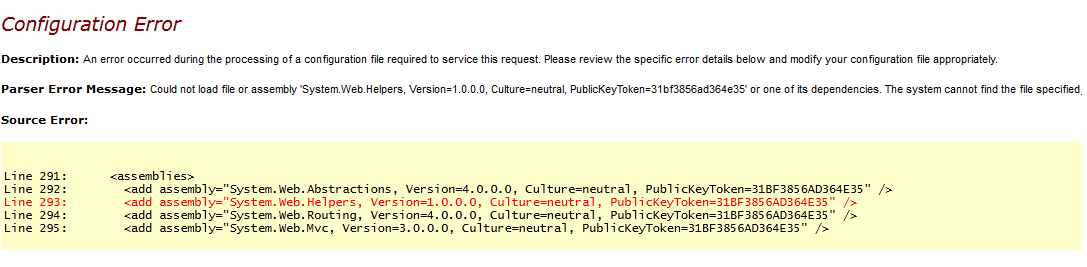 Could not load file or assembly 'System.Web.Helpers, Version=1.0.0.0, Culture=neutral, PublicKeyToken=31bf3856ad364e35' or one of its dependencies. The system cannot find the file specified


Tuesday, April 17, 2012
Copy your code as HTML In Visual Studio (WYSIWYG)
Have you ever needed to put your code developed in visual studio in your blog or website to share it?
If yes then this blog post is going to share about good add-on of Visual studio called "Copy As HTML"
If yes then this blog post is going to share about good add-on of Visual studio called "Copy As HTML"
Sunday, March 4, 2012
Microsoft has released Visual-Studio 2011 beta and Window 8 Consumer preview
Microsoft has released 2 great new version of it's products which includes visual stuido 2011 beta which is development environment (IDE) for .net programmer and new version of OS Window8-consumer preview.

Visual Studio 2011 Beta
Jason Zander has first announced regarding release of Visual Studio 11 Beta & .NET 4.5 Beta on his blog post.
Download it from here + Download Visual Studio 2011 Beta
This time Visual Studio lunched with totally new look combine with many new feathers as below.
You can read each & every fether on Visual studio magazine's post about "Inside Visual Studio 11: A Guided Tour".
Scott Hanselman has also written about overview of features available with Visual Studio 2011 beta in his blog post.
Window-8 Consumer Preview
Steven Sinofsky has first made announcement on his blog post of "Windows 8 – The Consumer Preview" availability for download.if you are in hurry to look inside it then visit this and starting now at http://preview.windows.com.
Read this guidelines before installation
There are lots of post (i think many people rushed out to write about that to be a first blogger to write on this topic!) available on internet about Window 8 features so i don't want to talk about it here.
just google it - Window 8 features :)

Visual Studio 2011 Beta
Jason Zander has first announced regarding release of Visual Studio 11 Beta & .NET 4.5 Beta on his blog post.
Download it from here + Download Visual Studio 2011 Beta
This time Visual Studio lunched with totally new look combine with many new feathers as below.
- Project Compatibility
- IDE Productivity Improvements
- Search Everywhere
- Toolbar Improvements
- Additional Tooling
- Multiple-Monitor Support
- Performance Enhancements
- New Project Types
- Extensibility
You can read each & every fether on Visual studio magazine's post about "Inside Visual Studio 11: A Guided Tour".
Scott Hanselman has also written about overview of features available with Visual Studio 2011 beta in his blog post.
Window-8 Consumer Preview
Steven Sinofsky has first made announcement on his blog post of "Windows 8 – The Consumer Preview" availability for download.if you are in hurry to look inside it then visit this and starting now at http://preview.windows.com.
Read this guidelines before installation
- How To Guide to Installing and Booting Windows 8 Consumer Preview off a VHD by Scott Hanselman
- Windows 8 Installation Guides by Amit Agrawal.
There are lots of post (i think many people rushed out to write about that to be a first blogger to write on this topic!) available on internet about Window 8 features so i don't want to talk about it here.
just google it - Window 8 features :)
Monday, February 27, 2012
HTML5 target schema for visual studio
If you are web developer then you know that every web application is build on stack of html controls, when you say we are building asp.net application using asp.net controls, then you need to understand that asp.net controls have higher level of abstraction.
An output of an ASP.NET server control can be the result of many HTML tags that combine together to produce that control and its events.
If you want to read more about difference between HTML controls and ASP.NET server control then visit this link.
When you are designing aspx/html/cshtml page inside visual studio you need to specify target schema for validation as per below (By default it is selected so some people don't aware of this!)

Today HTML5 is in demand and it is supported by most of browsers, some people says that HTML5 will remove flash from web!
Anyway if you want to know more about HTML5 and it's features then following are good links.
If you want to take benefit of Intelisense and validation of html5 controls in visual studio then you need to install target schema for html5 from here first,then you can see it in that list and select that schema for your application as per below.


An output of an ASP.NET server control can be the result of many HTML tags that combine together to produce that control and its events.
If you want to read more about difference between HTML controls and ASP.NET server control then visit this link.
When you are designing aspx/html/cshtml page inside visual studio you need to specify target schema for validation as per below (By default it is selected so some people don't aware of this!)
Today HTML5 is in demand and it is supported by most of browsers, some people says that HTML5 will remove flash from web!
Anyway if you want to know more about HTML5 and it's features then following are good links.
If you want to take benefit of Intelisense and validation of html5 controls in visual studio then you need to install target schema for html5 from here first,then you can see it in that list and select that schema for your application as per below.
Thursday, February 16, 2012
Step by Step : Upload asp.net web application to Window Azure
Window Azure is in demand for cloud hosting to host asp.net web application and make scalable that application as per retirements, so I would like to describe here step by step to upload asp.net application on window azure. so let's start!

Create New Project > ASP.NET web application
Create New Cloud Project and Just click OK without selecting anything
Go to Cloud Project > Right click on Roles Folder > Add web role from solution as per below fig.
Here you can configure your cloud project with .csdef config file (you can also add stratup task in that.)
Build Solution then right click on Cloud Project and click Publish, it will open dialog as per below.
Here i will go through "Create Service package only" which will create published files to upload manually on window azure portal, if you want details on 2nd option then please refer this link for Getting Started with the Windows Azure Tools for Visual Studio
- Click on "Configure Remote Desktop" if you want RDP connection to that application and chose certificate and credentials as per below
Click Ok on both dialogs and it will generate 2 files which we need to upload on Window azure portal
Create "New Hosted Service" on azure portal then fill details, choose certificates and browse 2 published files in step-9 and click ok
cheers!


Thursday, February 9, 2012
Alternate way to set default browser in VS2010
If you are using Visual studio on daily basis for development then you are familiar about to change default browser setting as per shown in below fig.

Right click on any aspx page and click "browse with" will open window with installed browser list and you can set default browser for that application.
But if you are working with MVC3 application where aspx page is not available then how you can change this setting? because browse with option only available with aspx or html page
Some person prefer to add extra aspx page or html page to application change this setting, however i explore alternate way to do this as per below..
Following are steps i have followed to change my default browser to chrome


Right click on any aspx page and click "browse with" will open window with installed browser list and you can set default browser for that application.
But if you are working with MVC3 application where aspx page is not available then how you can change this setting? because browse with option only available with aspx or html page
Some person prefer to add extra aspx page or html page to application change this setting, however i explore alternate way to do this as per below..
Following are steps i have followed to change my default browser to chrome
- Open the web project properties
- Go to Web tab
- In Start Action section select Start external program and then add chrome executable path and the url as Command line arguments.
- In Servers section set specific port to the same port set in the URL in step 3.
Saturday, January 14, 2012
Explore Visual studio 2010 - Navigate To option
Generally it is very tedious task to search any page or file form solution explorer , open it and switch between them with mouse click.
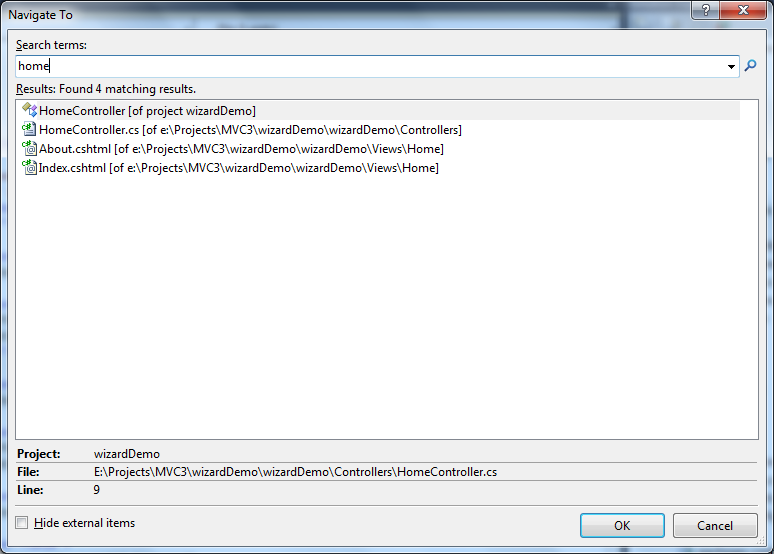
Although you have shortcut to go at solution explorer ctr+w+S then also you need to look around folder hierarchy.
In visual studio 2010 very useful shortcut to go with specific file by Navigate To option Just hit CTR + < and write about file name or page, it will listed all files relevant to your search keyword as per shown in fig.
and with up down key you go with specific file and just hit enter to open that.
so speed up your visual studio experience !!
so speed up your visual studio experience !!
Wednesday, January 11, 2012
Use web.config transfromation in visual studio
Generally most of programmers maintain their connection string and other setting of live environment in signal web.config with comment to switch in to live environment and will do manual changes whenever need to change environment.
However Visual studio gives you facility to make this transformation automatically, so today I would like to explore this idea here.
When you create new project in Visual studio 2010, it has separate configuration for debug and release as you can see in following fig.

You can set specific configuration from toolbar and create new environment as well and add new configuration source under web.config as per shown in below figs.


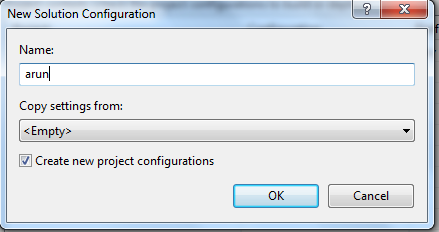
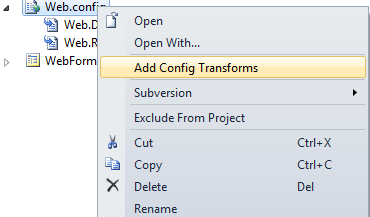
Let's take an example in web.Release.config write connection string as per shown in below fig.

In the above example "SetAttributes" transform will change the value of "connectionString" to use "ReleaseSQLServer" only when the "Match" locator finds an attribute "name" that has a value of "MyDB".
Read more about syntax on msdn
Look at video about this here
Monday, January 2, 2012
Testing Nuget Package before Publishing
As you know that Nuget.org is not allow you to delete youre package once you have published. just they are giving facility to hidden it from search result as per their policy.
That's why it is essential to test it before publishing your pacakge to nuget. so I would like to go step by step process how you can test your package.
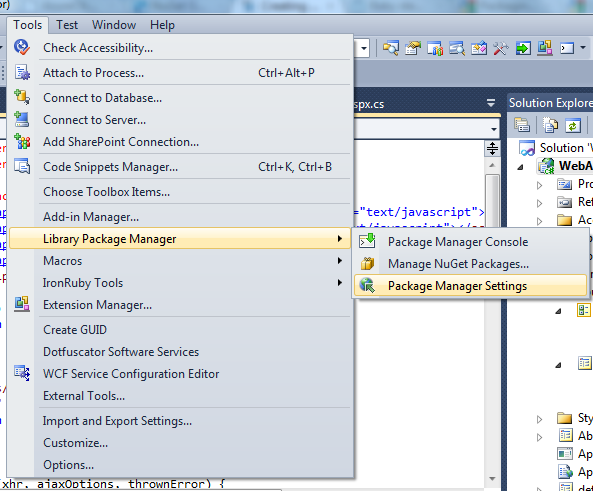


3) select package source


That's why it is essential to test it before publishing your pacakge to nuget. so I would like to go step by step process how you can test your package.
1) Create directory and save packages
C:\\Nuget Package and save your package (.nupkg)
2) Add source path in VS2010
open visual studio go to > tools > Library Package Manager > Package Manager Setting3) select package source
and now you can test your package using command as you are doing with
official Nuget packages.
official Nuget packages.
when you will finalize your testing then you can publish at last.
Cheers!
Thursday, November 10, 2011
Enable intellisense with HTML & css in Visual Studio using Web Essentials Extension
If you are using visual studio 2010 then this is good to know that now it is possible to use intellisense with css & html file by adding "web essential" extension. So by using it you can increase your productivity in Visual Studio , it's awesome!
This extension developed by Mads Kristensen .
you can download from here.
Alternate way you can add it in visual studio by Extension Manager


Now when you open any css file then as per above you will able to add property value through intellisense and that's great feather for designer.
Cheers!
Related Links
http://visualstudiogallery.msdn.microsoft.com/6ed4c78f-a23e-49ad-b5fd-369af0c2107f
http://www.hanselman.com/blog/UsefulVisualStudioExtensionWebEssentialsFromMadsKristensen.aspx
This extension developed by Mads Kristensen .
you can download from here.
Alternate way you can add it in visual studio by Extension Manager


Now when you open any css file then as per above you will able to add property value through intellisense and that's great feather for designer.
Cheers!
Related Links
http://visualstudiogallery.msdn.microsoft.com/6ed4c78f-a23e-49ad-b5fd-369af0c2107f
http://www.hanselman.com/blog/UsefulVisualStudioExtensionWebEssentialsFromMadsKristensen.aspx
Saturday, November 5, 2011
Cool Tips to speed up in visual studio 2010 - Short keys
If you are .Net developer or Student and you are using Visual Studio in day to day life then following tips can speed up your productivity on that.
There are some hot key which are beneficial to your daily programing , practice on that
Code Outline:
Ctrl+M , M – Fold/Unfold the current code block
Ctrl+M, L – Unfold all
Ctrl+M, P – Stop outlining
Ctrl+M, O – Fold all


Line No in Code – Tools>Options>Text Editor>All Languages>General>Line numbers.
BookMark:
Ctrl+K, K – Create/Remove Bookmark
Ctrl+K, N - Move to next bookmark
Ctrl+K, P – Move to previous bookmark
Ctrl+K, L – Clear all bookmarks
Code Format:
Ctrl+K, F – Auto-format selection
Ctrl+U - Convert to lower case
Ctrl+Shift+U – Convert to upper case
Ctrl+K, C – Comment selection
Ctrl+K, U - Uncomment selection
Running/Debugging:
F5 - Start Application in debug Mode
Ctrl+F5 – Start Without debugging
F11 – Step into
F10 – Step over.
Shift + F11 – Step Out.
Shift + F5 – Stop debugging.
Ctrl+Shift+F5 - Restart Debugging.
The best way to use any tools by knowing the hot key (short key) to do anythings with that tools
Visual Studio is vast product and you can do many thing as your mind can think
There are some hot key which are beneficial to your daily programing , practice on that
Ctrl+M , M – Fold/Unfold the current code block
Ctrl+M, L – Unfold all
Ctrl+M, P – Stop outlining
Ctrl+M, O – Fold all

Editing:
Block Selection: – press Alt and then select the area you want with your mouse.
Line No in Code – Tools>Options>Text Editor>All Languages>General>Line numbers.
F4: Property Window
Ctrl+Alt+L – Solution Explorer
Ctrl+Alt+O – Output Window
Ctrl+Alt+K – Task List
Ctrl+Shift+Space – intellisense window.
Ctrl+R – Word Wrap
Ctrl+Alt+L – Solution Explorer
Ctrl+Alt+O – Output Window
Ctrl+Alt+K – Task List
Ctrl+Shift+Space – intellisense window.
Ctrl+R – Word Wrap
Ctrl+K, K – Create/Remove Bookmark
Ctrl+K, N - Move to next bookmark
Ctrl+K, P – Move to previous bookmark
Ctrl+K, L – Clear all bookmarks
Code Format:
Ctrl+K, F – Auto-format selection
Ctrl+U - Convert to lower case
Ctrl+Shift+U – Convert to upper case
Ctrl+K, C – Comment selection
Ctrl+K, U - Uncomment selection
Running/Debugging:
F5 - Start Application in debug Mode
Ctrl+F5 – Start Without debugging
F11 – Step into
F10 – Step over.
Shift + F11 – Step Out.
Shift + F5 – Stop debugging.
Ctrl+Shift+F5 - Restart Debugging.
You can download full list of short keys from this link
Happy Programming , cheers!
Subscribe to:
Posts (Atom)