Showing posts with label Nuget. Show all posts

Thursday, March 1, 2012

Extend the built-in ASP.NET DataAnnotations using DataAnnotations Extensions

0 comments
If you have worked with development of web service, silverlight application or mvc applicaiton then you know about DataAnnotations class to validate DTO client side as well as server side.

DataAnnotations contains mostly Required, Range, RegularExpression and StringLength and to see full list of attributes it contains visit this msdn link "Using Data Annotations to Customize Data Classes" .

In my mvc application there is person class (Model) and validation for email as per below (by regular expression)


Scott Kirkland has extended this and created excellent DataAnnotations Extensions pacakge for .net to allow more validation attributes, also he has explained about this in his blog post with examples.

so after installing DataAnnotations Extensions Nuget package i can write email validation as per below


Following are list of more validation attributes available in  DataAnnotations Extensions
  •     CreditCardAttribute
  •     CuitAttribute
  •     DateAttribute
  •     DigitsAttribute
  •     EmailAttribute
  •     EqualToAttribute
  •     FileExtensionsAttribute
  •     IntegerAttribute
  •     MaxAttribute
  •     MinAttribute
  •     NumericAttribute
  •     UrlAttribute
  •     YearAttribute
You can see demo of each & every attributes here.

Tuesday, February 21, 2012

Add Elamh to ASP.NET MVC application

0 comments
Elmah is great open source module developed by Atif Aziz to handle error logging for asp.net application and there is nuget pacakge also available to add in to existing application. If you are new to Elmah then visit my previous post to started with it.

Alexander Beletsky has developed Elmah.Mvc for asp.net mvc application it is also available through Nuget package.
You can add it by GUI tool as per below
Go to Reference> Manage Nuget Pacakge > Search Elamh.MVC


OR By Package Manager console as per below

Now Hit admin/elmah with your app's URL,you will get elmah page. That's it!

Please refer Author's blog post about what are the changes in this MVC version of Elmah.


Friday, January 6, 2012

Introduction of Glimpse-Debugging your server within client

0 comments
Open source community developers developing the great tools for debugging and i came across today such a great Nuget Pacakge called glimpse when i was learning MVC3.

what is glimpse? It's says that
"What Firebug is for the client, Glimpse does for the server... in other words, a client side Glimpse into whats going on in your server."
Glimpse is Firebug like client side debugger,implemented in JavaScript on the client side, look in to ASP.NET on server side.

1) Install glimpse with following nuget command


and after that type glimpse.axd to end of URL redirect to glimpse page e.g. http://localhost:49270/glimpse.axd

2) Turn On


click on bottom right corner as per show in below fig.


3) Look in to server within client

I have write following code in controller to look at trace


Read More

Scott Hanselman's blog

http://www.hanselman.com/blog/NuGetPackageOfTheWeek5DebuggingASPNETMVCApplicationsWithGlimpse.aspx

Glimpse official site

http://getglimpse.com/

http://getglimpse.com/Help


Monday, January 2, 2012

Testing Nuget Package before Publishing

0 comments
As you know that Nuget.org is not allow you to delete youre package once you have published. just they are giving facility to hidden it from search result as per their policy.


That's why it is essential to test it before publishing your pacakge to nuget. so I would like to go step by step process how you can test your package.


1) Create directory and save packages
C:\\Nuget Package and save your package (.nupkg)


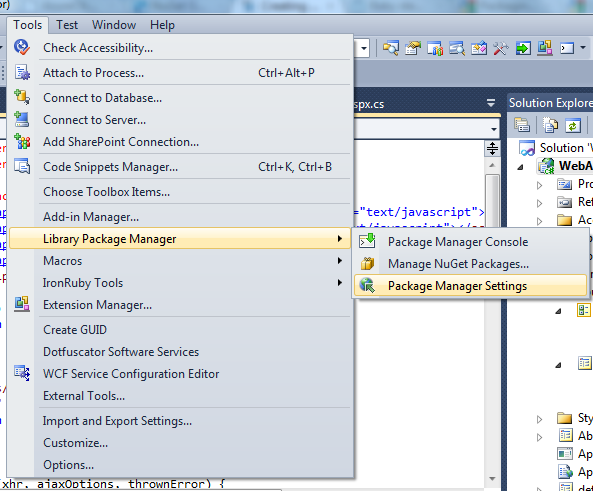
2) Add source path in VS2010
open visual studio go to > tools >  Library Package Manager > Package Manager Setting


3) select package source


and now you can test your package using command as you are doing with
official Nuget packages.


when you will finalize your testing then you can publish at last.
Cheers!


Thursday, December 29, 2011

Create Nuget Package with powershell script

0 comments


There are so many blogs available to creating nuget package but i would like to go in more details with powershell script option in that.

Use GUI tool

Using commnad lines (http://docs.nuget.org/docs/creating-packages/creating-and-publishing-a-package ) you can create whole package however better way is to use GUI (Nuget Package Explorer)

Please look below link & follow step

Know about Directory structure

Directory structure of Nuget Package as per docs.nuget.org

  • tools – contains Powershell scripts
  • lib – contains assemblies (dlls)
  • content – contains files to be added on root path

Alter web.config or app.config and Source

If you want to add some settings in configuration file then it is also possible using .tranform
Just add web.config or app.config in \content folder with .tranform extension e.g.
web.config.transform
app.config.tranform


Using Powershell Script

Now if you want some manipulation with files in project then you have to add Powershell Script
under \tool folder , following 3 types files you can add for that , read about in more details at here

    • Init.ps1 runs the first time a package is installed in a solution.
  • Install.ps1 runs when a package is installed in a project.
  • Uninstall.ps1 runs every time a package is uninstalled.


Example to change property value of Project's Item & dispaly popup Message

Here i am going to create install.ps1 and add powsershell script to change property of Test.exe file
Copy To Output Directory = Copy Always

using
$project.ProjectItems.Item("Test.exe").Properties.Item("CopyToOutputDirectory").Value = 1

also add script to open popup at last as per shown in below figs.