Wednesday, February 8, 2012

Use JIRA for Agile developmnet

0 comments
JIRA is the great web interface tool provided by atlassian.
There are on demand pricing list to use this product also use can take trial at free cost.

JIRA Features
Read more about using jira for agile development
Jira web interface also support keyboard shortcuts
Look at Jira demonstration video
Look at slides presentation Introduction to jira


Tuesday, February 7, 2012

Add "You may also like" widget to your blogger

0 comments
I have found many blogs which have some links at bottom side with title "You may also like these" and did some research how can i add this in to my blogs and found some interesting website http://www.linkwithin.com
would like to share here..

This is very simple process with below features
  •     No registration or e-mail confirmation required except the first field.
  •     You can use this widget on as many of your blogs as you like.
  •     You can choose WordPress or Blogger platform.
  •     You can choose number of stories the widget will display.


    Step-1 Fill Details of your blog
    Step-2 Click Install Widget (you need to login in your blogger account if you are not logged in)
    Step-3 Select blog if your have more then one blog and click "Add widget" you can also drag and drop to
           any area on blog where you want to display it
    Step-4 Click Save and you're done!


Thursday, January 26, 2012

Change your fb profile with facebook Timeline

0 comments

Facebook has lunched Timeline in previous year and many of people has already converted their profiles to Facebook Timeline (new look), Today i have also converted my profile with fb Timeline so following are steps you need to look if you would like to convert your profile as well!.


  1. Just login to your facebook account
  2. You will get all details here about Timeline and introduction video
  3. "Get Timline" - Convert your current profile with Timline (still not published)
  4. "Start Tour" - Go through guidlines of Timeline
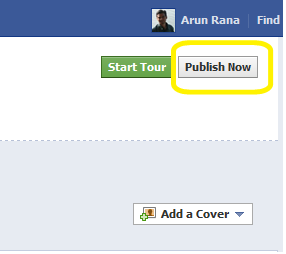
  5. "Publish Now" - Publish your facebook profile with Timeline

and that's it! enjoy the new look with Timeline , it's really awesome!!

Read More

Saturday, January 21, 2012

A hassle-free tool to schedule events

0 comments
Now days many people organize different events, it should be public event, group event, technical event or anything you need to first decide about time convenience of participants.

so just go to Doodle

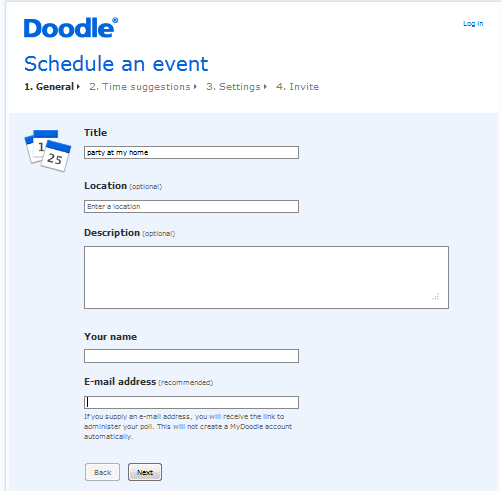
Here I have created one event "party at my home" (not in real!) without any registration. see here step by step..

1)Create Poll  
Create your poll and other information like place, email


2)Set Date & Time

Date and time slots, you can add more date and time slots if you want to give more choice to participants.


3)Select type of poll

I have spiked this because i want basic poll.


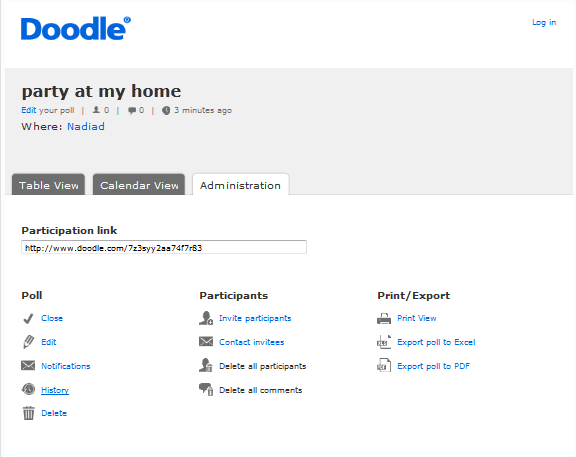
4)Share link & Administration link

It will provide 2 link on completion as per below

Share link: you have to share your friends to give their choice
http://www.doodle.com/7z3syy2aa74f7r83

Administration link: administer this poll and arrange your event as per participant's convenient date and time

Happy Scheduling!!!!!!!


Let know the other people about your availability

0 comments
If you are professional, employee, business person, students, volunteer (or not started anything yet!) you can inform others about your availability with tungle

I have scheduled my availability for next week
just hit this http://www.tungle.me/arunrana

Very easy steps to create this (Really!! Let's see)

1) Create account

you need to create account here, you can use OpenId also like Google, Facebook etc.

2) Pick URL
you need to pick URL which will allow to display your availability to others as per shown in fig.


3) Complete your profile
You have to complete your profile by others details if you wish!


4) Edit your schedule

you can edit your schedule her using interactive calendar interface (very user friendly) and save it.

that's it! remaining step is share your URLs to others and be busy guy! from today..